Article • 10 min read
Knowledge-centered service (KCS): A guide to smarter support
Knowledge-centered service is a methodology where knowledge is continuously created and updated as part of resolving customer interactions. This knowledge management process improves customer service and organizational productivity.


Lauren Hakim
Director, Product Marketing
Última actualización en March 9, 2026


What is knowledge-centered service?
Knowledge-centered service (KCS) is the practice of improving employee and customer experiences by turning everyday support interactions into shared, continuously updated knowledge.
KCS enables agents to create, reuse, and refine knowledge as they solve real customer issues. It helps teams work more efficiently and deliver faster, more consistent support. This drives stronger CX results like higher CSAT scores.
If leveraged strategically, knowledge is one of the most valuable assets a business can have. By prioritizing knowledge-centered service, organizations can save on support costs, boost customer experience (CX) and employee experience (EX), and unlock the power of purpose-driven knowledge management.
Instead of relying on information trapped in data silos, KCS helps teams share what they learn as they solve real customer issues. This reduces friction for agents and creates more consistent experiences for customers.
In this guide, we break down KCS and its benefits, the challenges teams face when adopting it, and how to put it into practice.
More in this guide:
- How does knowledge-centered service work?
- Benefits of knowledge-centered service
- Challenges of KCS (and how to overcome them)
- How to get started with knowledge-centered service
- Frequently asked questions
- Improve your knowledge-centered service with Zendesk
How does knowledge-centered service work?
Knowledge-centered service methodology builds on knowledge management (KM) practices and connects them directly to real support interactions.
A shared knowledge base (KB) plays a central role. It acts as a single source of truth for information about your products, services, and common customer questions. This type of knowledge management system helps teams capture, organize, and surface knowledge so it’s easy for both customers and agents to find and use.
A real-world example of knowledge management done right can be seen in how Canva approaches customer support through KCS. Its help center is designed to make knowledge easy to find and use. This supports customers who prefer self-service while giving agents a reliable foundation for more complex issues. Clear categories, an intuitive search experience, and consistently structured articles fast track resolutions.
When customers can’t find what they need on their own, clear paths to contact support help them reach an agent quickly. Those interactions then feed back into the knowledge base, improving answers for the next customer.
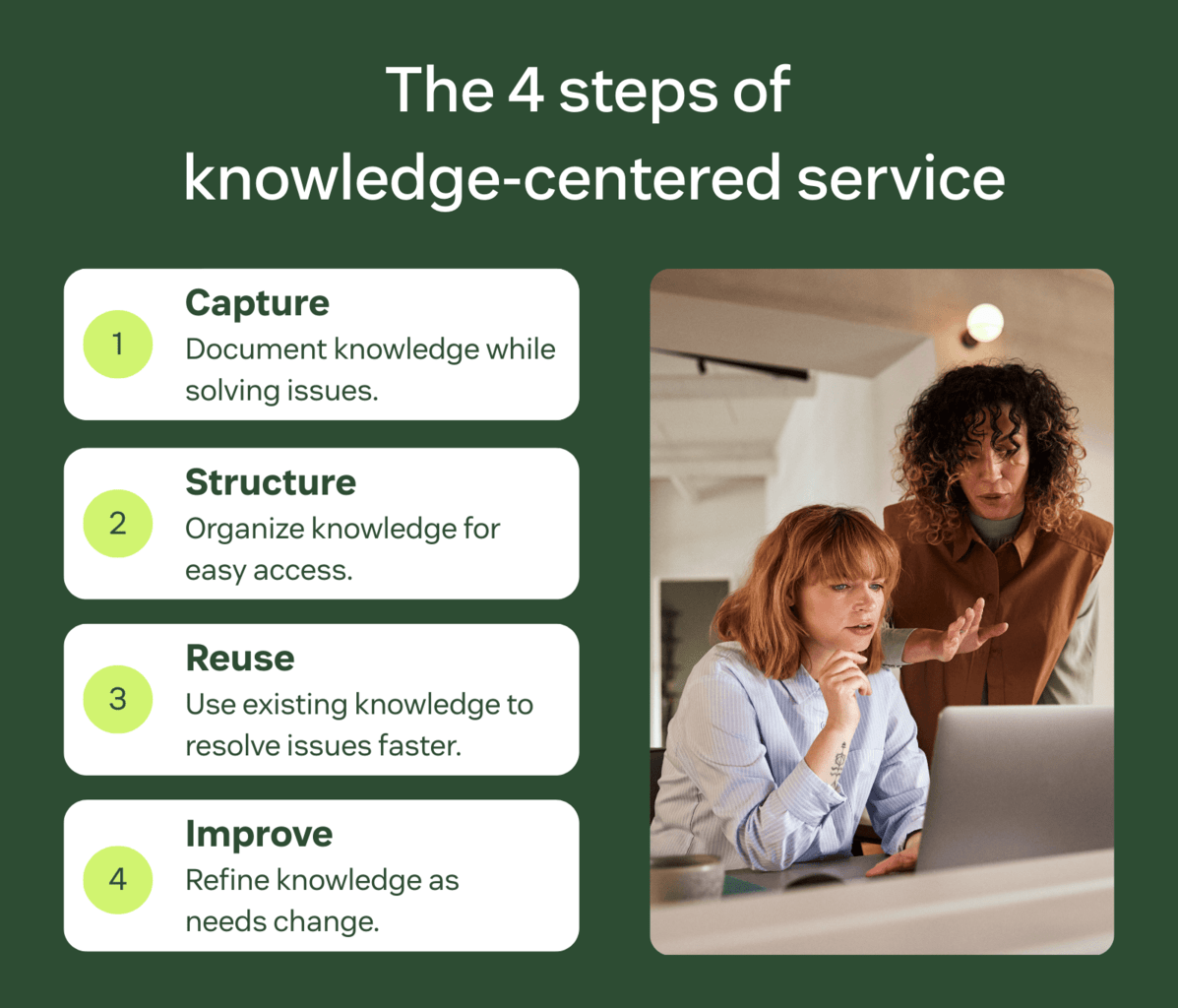
At a high level, the KCS process can be broken down into four main steps:
1. Capture
Every customer interaction is an opportunity to learn. Agents capture new knowledge or update existing content as they solve real issues, using the customer’s language rather than internal jargon.
2. Structure
Knowledge is organized in a consistent, searchable way so it’s easy for both agents and customers to use. This includes clear article formats, intention in language choices, and access rules that support different audiences.
3. Reuse
Existing knowledge is used wherever possible, so teams don’t have to solve the same problem twice. This reduces average handle time (AHT), improves consistency, and builds confidence in the accuracy of shared knowledge.
4. Improve
Knowledge is continuously refined based on use, feedback, and customer needs. Over time, the most valuable content becomes clearer, more accurate, and more effective at preventing escalations.
Benefits of knowledge-centered service
Next, let’s look at some of the top benefits KCS can bring to your organization.
Improves the customer experience
Customer experience is shaped by how quickly and consistently they receive customer service. Knowledge-centered service improves CX by ensuring accurate answers are easier to find, whether customers are using self-service or communicating with an agent.
When service teams embrace KCS, they create a shared body of knowledge that supports both customers and support agents. Customers can resolve common issues through self-service customer service portals, while agents rely on documented knowledge to handle more complex questions with confidence. This builds customer loyalty by enabling faster resolutions, more consistent answers across channels, and a smoother overall support experience.
Helps create a knowledge base quickly
When support agents follow KCS principles, they document customer interactions in real time. This leads to expansive internal documents that support agents can use, and information that can be transformed into external resources like FAQ pages and product guides. This continuous, organic capture of knowledge means that the database grows quickly and has practical information that customers will find useful.
Enhances security
Knowledge-centered service enhances security and consistency by standardizing how agents handle sensitive information. Knowledge articles can document approved processes for data handling, identity verification, and compliance, helping teams follow best practices during every interaction.
By centralizing this guidance within shared knowledge management software, organizations reduce the risk of inconsistent handling and reliance on undocumented processes. This makes it easier to maintain security standards as teams scale and service volume increases.
Boosts team productivity
Knowledge-centered service significantly boosts team productivity by reducing the time spent searching for information. With a well-structured knowledge base, support agents can access information about similar support interactions they are currently handling and other documents that can help them do their jobs more easily. Additionally, knowledge base features can streamline document searching, making it that much easier for users to find the information they need.
Reduces support costs
An extensive knowledge center can reduce support costs via self-service resources that help customers solve issues independently. This can relieve pressure on your support team and reduce labor costs. Also, a centralized knowledge base helps new hires get up to speed quickly, reducing onboarding costs and empowering them to become productive faster.
Challenges of KCS (and how to overcome them)
Knowledge-centered service strengthens all your institutional knowledge and helps to reduce disorganization, miscommunication, and customer frustration. However, KCS may not come naturally to all businesses.
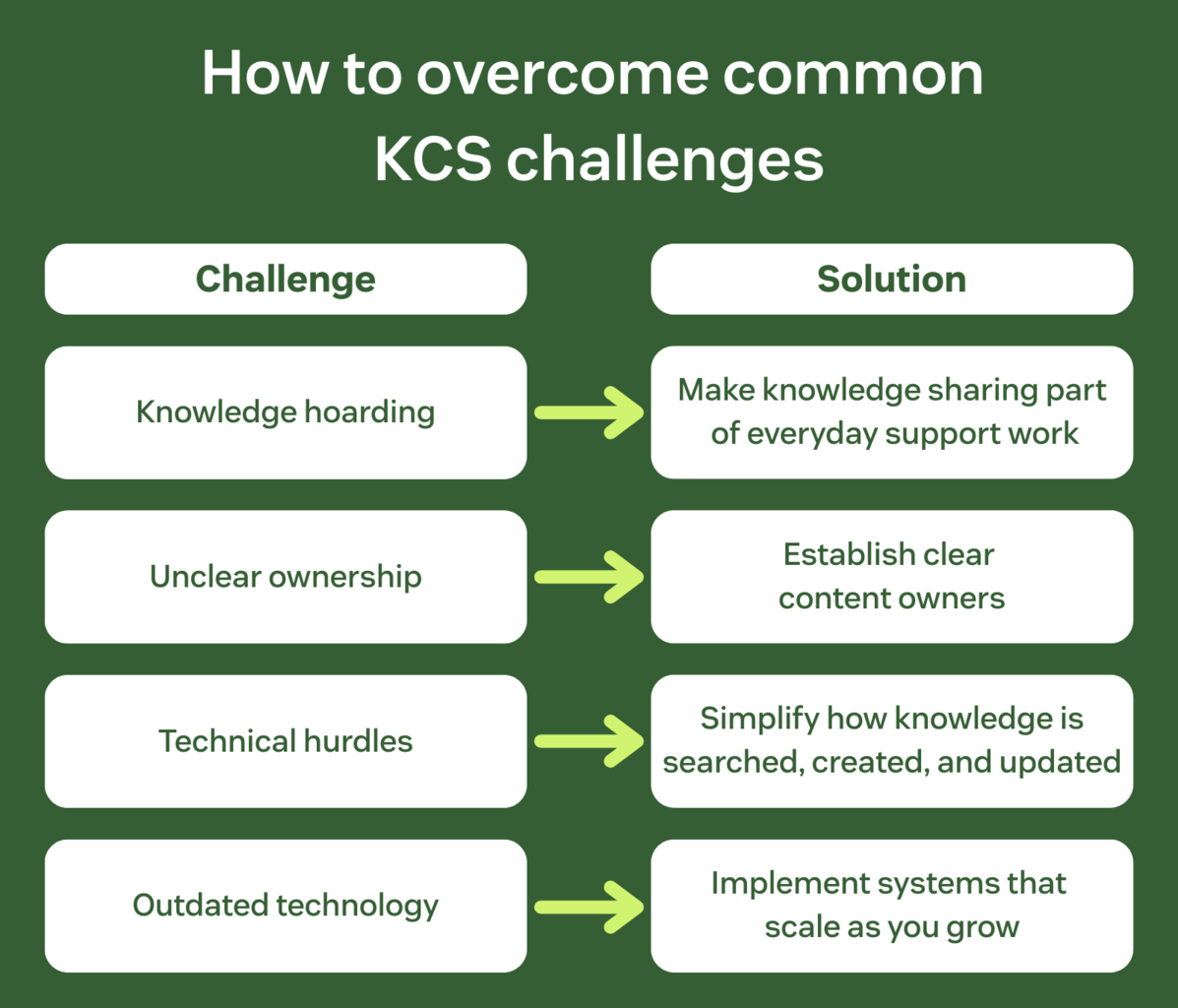
Here are some of the common challenges that limit successful KCS adoption. We’ve also included the knowledge management best practices you can implement to overcome them.
Culture of knowledge hoarding
Some employees may be reluctant to share their knowledge, either due to job insecurity fears or not knowing how to. To address this, make knowledge sharing a visible part of everyday support work. Recognize and reinforce contributions, so teams see knowledge as a shared responsibility, not a personal risk.
Lack of ownership and dedicated resources
Defining roles and skill sets is a knowledge management best practice. Without it, maintaining and updating a knowledge base can be difficult. Establish clear content owners within your team who are responsible for reviewing, maintaining, and improving high-value content. This creates accountability at the individual level, while keeping knowledge ownership distributed across the organization.
Technical hurdles
Complex or unintuitive tools make it harder for CX agents to find and update knowledge in the moment. Look for ways to simplify knowledge workflows by reducing the steps required to search, create, and update content. The easier it is to contribute, the more consistently knowledge can be used and improved upon.
Outdated technology
Legacy knowledge systems can struggle to keep up as support volume, channels, and customer expectations grow. Regularly evaluate whether your knowledge technology can scale with your business and support collaboration across teams. Modern, flexible platforms make it easier to sustain KCS over time.
When you keep the above in mind, you’ll have an easier time implementing and operating with KCS.
How to get started with knowledge-centered service
Now that you know the benefits and challenges to look out for, let’s cover some tips on KCS and building a knowledge base.
Embrace AI and automation
AI-powered knowledge base tools can help streamline knowledge creation, organization, and retrieval. By leveraging these technologies, organizations can enhance operational efficiency and productivity. For example, AI agents—otherwise known as advanced chatbots—can help support organizations optimize their knowledge base and CX.
For customers, AI agents provide personalized, 24/7 service, directing them to relevant help center articles and fully resolving even the most sophisticated customer issues in seconds. They can also execute tasks from start to finish, allowing employees to focus on more demanding responsibilities. Not only that, but they can also leverage actionable insights to detect workflow issues, suggest automation, and boost productivity.
To see this in practice, look no further than Hello Sugar. The growing beauty and wellness brand uses Zendesk AI agents to build its knowledge base and successfully automate its customer service.

Take a customer-first approach
Having a customer-first mindset means putting the customer at the center of organizational decision-making rather than focusing only on products or profits. When adopting KCS, keep the customer in mind when designing your knowledge base and the type of content you produce. Check common support ticket questions and consider the topics they may struggle with to guide your asset creation. Also, be sure your search functionality is intuitive, making it easy for them to find what they need.
Choose the right knowledge base software
For truly effective knowledge-centered service, choose knowledge base software that fits your needs perfectly. It should have advanced features like AI capabilities that make it easier for employees to create assets, and customers to find them. Additionally, ensure your chosen solution is easy to use, delivers a fast time to value, and can grow with you as you grow your business.
Create relevant content
One of the most important aspects of KCS is creating relevant content. Ensure that your knowledge articles are effective and directly address customers’ most common issues. A great way to do this is with generative AI.
You can use generative AI to identify any knowledge gaps in your content or spotlight common trends in support tickets. Once the AI determines which topics you should write about, it can also help you create content by turning your quick summary into a complete help center article.
Review and improve
Finally, be sure you complete performance assessments and conduct regular audits to identify any inefficiencies in your processes. One way of doing that is by keeping an eye on customer service metrics like customer satisfaction (CSAT) scores to spot any troubling trends or drops in performance.
Also, you could lean on AI to automatically spot trends and suggest new articles. This can help you highlight exactly what your customers are looking for, allowing you to lean on generative AI to create those assets. Furthermore, AI agents can automatically detect issues and bottlenecks, helping you improve service quality and optimize your quality assurance (QA) process.
Frequently asked questions
Improve your knowledge-centered service with Zendesk
The quality of your knowledge-centered service (KCS) depends on how effectively you capture, organize, and share what your teams know. The right tools make this process smoother, helping agents resolve issues faster and giving customers access to accurate, consistent information.
Zendesk is designed to support knowledge-centered service (KCS) by combining knowledge, workflows, and support in one platform. A well-maintained help center makes it easier for customers to find accurate answers quickly through self-service and agents to reuse and improve knowledge as part of their everyday work.
Zendesk AI helps teams identify knowledge gaps, draft and refine content, and route customer issues more effectively. This keeps knowledge current as organizations scale, without adding complexity.