Lovely Views
Enhanced views: auto-refresh, AI summary in full preview, advanced search & more
instalaciones
200+
Trabaja con
Support
Desarrollador
Lovestock & Leaf
About this app
Your complete workspace for Zendesk queues
Lovely Views is built for support teams that depend on Zendesk views every day, particularly growing teams managing busy queues, complex workflows, or large numbers of views.
As ticket volumes grow, agents can spend more time refreshing queues, opening tickets, switching between tabs, and trying to find the right information. Lovely Views brings views, advanced search, bookmarks, recent activity, and agent workloads into one organized, auto-refreshing workspace.
Agents can scan tickets in a table or card layout, review the complete conversation beside their results, and respond without opening every ticket separately. The result is less switching, better visibility, and a faster path from finding a ticket to resolving it.
Lovely Views works with the Zendesk views you already use and is ready to go with its default settings after installation. Extensive customization options let you tailor the workspace as your team and operation grow.
Everything agents need, in one place
Move easily between the queues and tools agents use throughout the day:
- List: Browse and organize views, searches, and folders
- Home: Keep important queues within easy reach
- Views: Work through existing Zendesk ticket views
- Seek: Run powerful searches and save the results for later
- Bookmarks: Set tickets aside for follow-up
- Activity: Return to recently viewed tickets
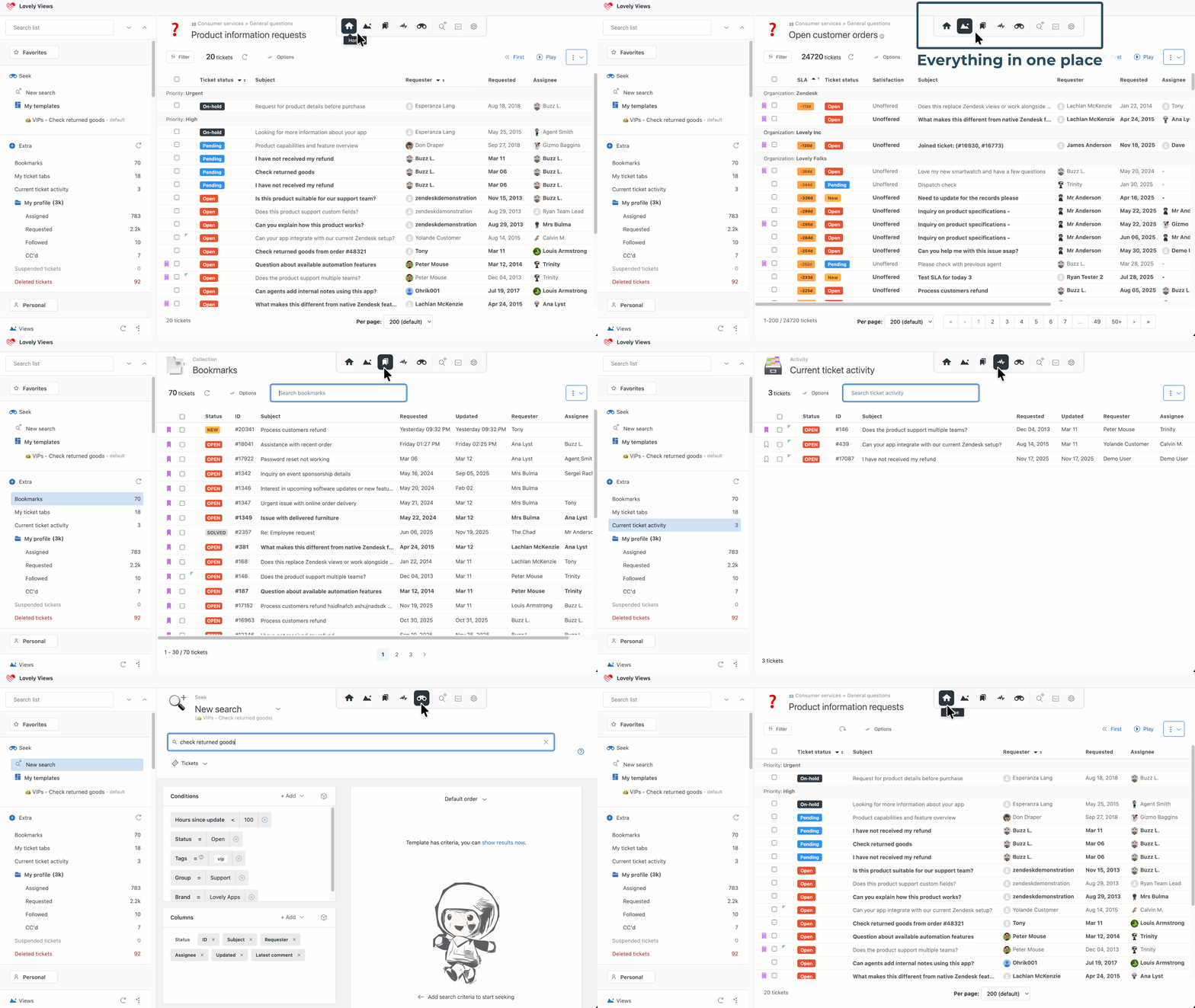
Agents can move from a queue to a search or recently viewed ticket without losing their place.
Understand and update tickets from the queue
Open preview or the side viewer to review the complete conversation and work on a ticket without leaving the queue. Preview opens over the results, while the side viewer keeps the ticket and queue visible side by side.
Review the requester, status, SLA, comments, side conversations, pinned comments, and other important ticket details while keeping the current queue visible. When AI summaries are available in your Zendesk account, agents can also use them to understand longer conversations more quickly.

When agents need to update a ticket, the side viewer lets them:
add a public reply or internal note
format text and attach files
select a new status
submit an update
change the ticket status without adding a comment

Comment filters and Gmail-style collapsing make long conversations easier to navigate. Inline images can be opened at full size and, where supported by Zendesk, comments can be translated directly from preview or the side viewer.

Agents get the context and controls they need without repeatedly leaving the queue.
Find tickets beyond the limits of standard views
Seek gives teams a more flexible way to search Zendesk.
Search using ticket fields, tags, requesters, organizations, groups, brands, forms, dates, keywords, and other conditions. Save useful searches and reopen them later to work through the results just like a regular queue.
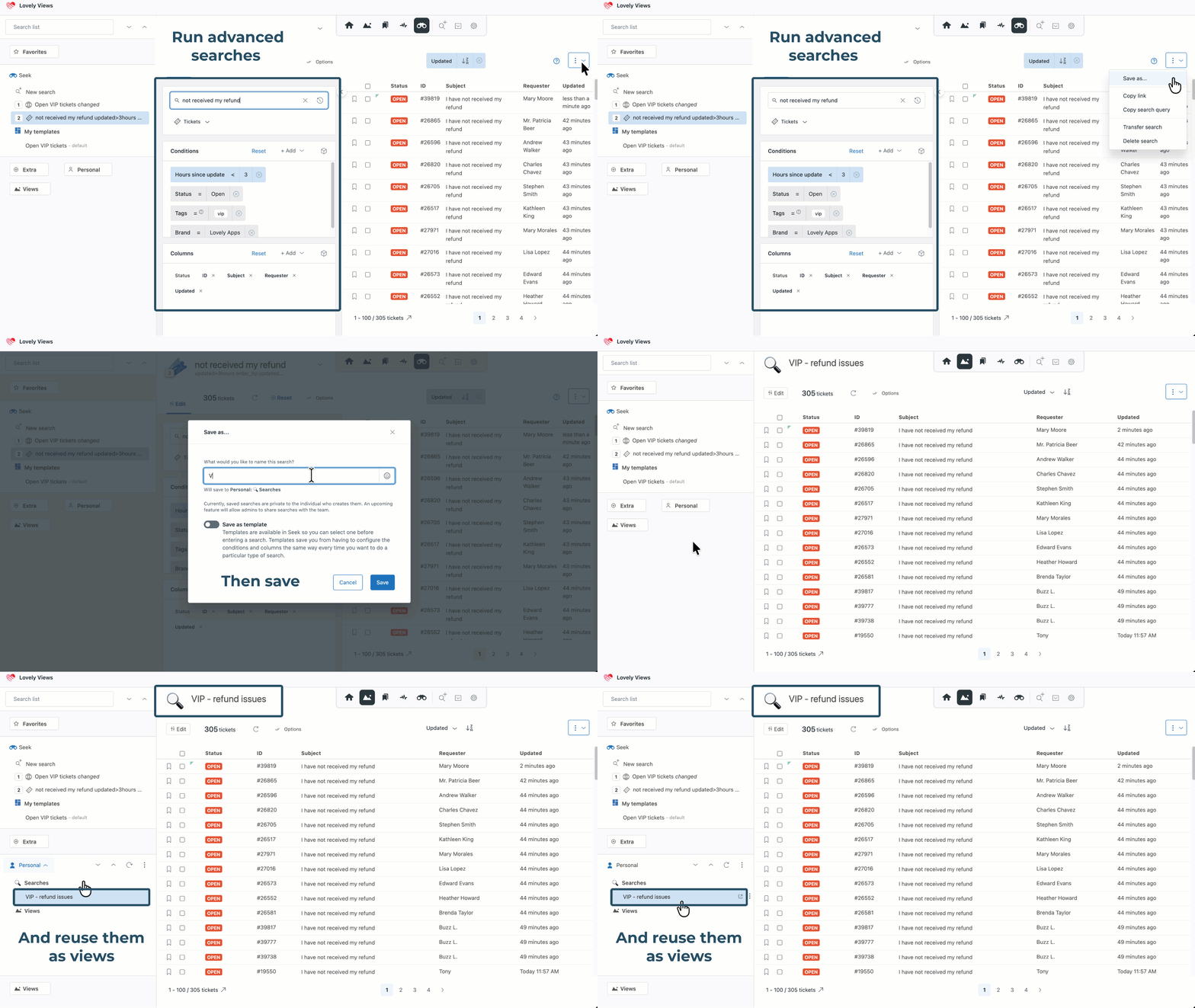
Admins can also share saved searches and search templates with other Lovely Views users. This gives agents ready-made searches for common workflows while still allowing them to create and manage their own.

Choose the clearest way to work
Switch between a traditional table and a visual card layout in Views, Seek, Bookmarks, Activity, and Home.
Card view makes it easier to scan ticket details, recent conversation activity, and unread tickets. Choose how much information appears on each card, then expand individual cards whenever more detail is needed.
A central view mode menu keeps display controls together, allowing agents to:
switch between table and card layouts
expand or collapse ticket text
show or hide summary rows
adjust how much ticket information is displayed

Each agent can choose the layout that best suits the queue, screen, and task in front of them.
Keep large Zendesk environments organized
Lovely Views gives growing teams practical tools for managing increasing numbers of views and tickets:
folders and subfolders
Favorites and Home shortcuts
searchable view lists
emoji markers for faster scanning
shared and personal saved searches
tools for renaming and reorganizing views
bulk ticket actions
ticket merging
read and unread controls
built-in queue navigation
Agent Home brings each agent’s workload together in clearly counted sections, while Updates highlights recent activity so they can quickly see what has changed.
Standard Zendesk views need to be refreshed manually to show new activity. Lovely Views keeps queues automatically up to date, helping teams respond to new tickets and changes sooner.
A workspace that fits your team
Lovely Views adapts to different screen sizes, workflows, and personal preferences.
Choose which ticket tools appear, collapse the views list when more working space is needed, and personalize the interface with light and dark themes. Whether your team works from a handful of critical queues or manages a large, complex Zendesk environment, Lovely Views provides a clearer way to stay in control.
Built on more than 14 years of Zendesk experience
Lovely Views is developed by Lovestock & Leaf, a Zendesk partner for more than 14 years and the team behind some of the Zendesk Marketplace’s most popular, 5-star-rated apps.
Our apps are used by thousands of agents every day and have been continuously refined through real-world use, customer feedback, and years of hands-on Zendesk experience.
Lovely Views is backed by detailed documentation, regular product development, and a support team that understands the needs of Zendesk customers.
See the difference in your own queues
Start your free 14-day trial and see how much easier it can be to find, understand, and update tickets.
Questions or planning a larger deployment? Contact support@lovestockleaf.com.
Privacy policy
Your privacy is important to us.
Lovestock & Leaf apps do not transfer or store sensitive Zendesk data outside of Zendesk. All data is processed through Zendesk’s APIs and remains within your Zendesk environment.
We are committed to transparency about how our apps handle Zendesk data.
For full details, please review our company privacy policy and Zendesk API data privacy handling notice: https://www.lovestockleaf.com/privacy
Detalles de la aplicación
Cómo instalar
Lovely Views is ready to use immediately after installation using the default settings, but you may want to customize the options to your needs. (In Lovely Views app, go to: 3 dots icon -> About / Preferences)
To fully understand Lovely Views features and capabilities, we strongly recommend you completely read the Users' Guide.
Dejar una evaluación
Comparte tu experiencia con el resto de la comunidad Zendesk