AttachmentFlow
Copy side conversation attachments to the main ticket—no download or re-upload.
instalaciones
Less than 5
Trabaja con
Support
Desarrollador
SteelLace27
About this app
AttachmentFlow is a focused Zendesk utility built to remove repetitive attachment handling from email side conversations.
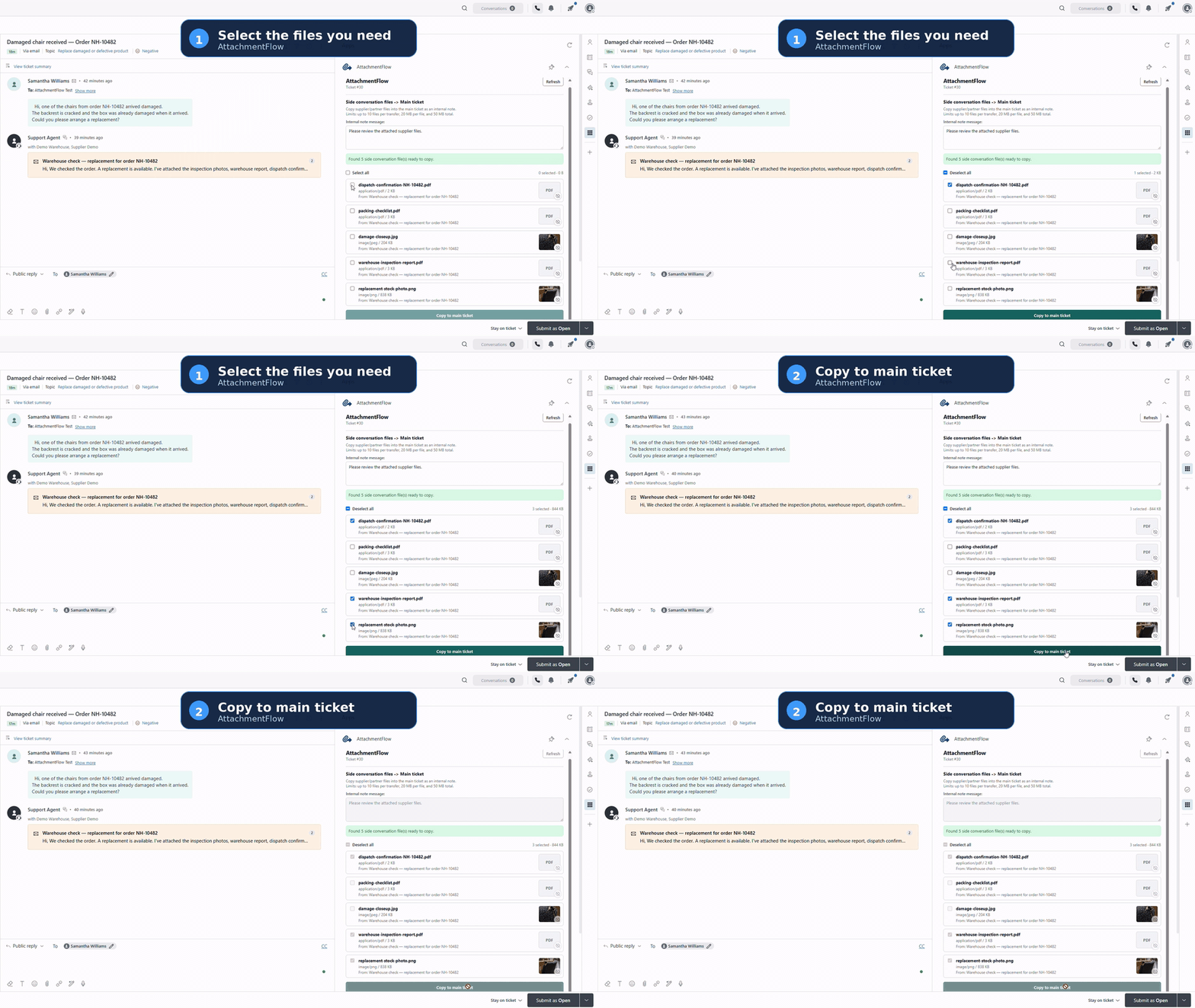
When a supplier, partner, or customer sends a file in an email side conversation, AttachmentFlow lets an agent copy it directly into the main ticket. Select one or more files, click Copy to main ticket, and the files are added as an internal note. The originals remain in the side conversation.
No download folder. No manual re-upload.
See AttachmentFlow in action
How it works
Open AttachmentFlow in the ticket sidebar.
Select one or more attachments from an email side conversation.
- Click Copy to main ticket.
The files are added to the main ticket as an internal note.
Every transfer is started manually by an authorised agent. AttachmentFlow does not run automatic or background synchronisation. If the files copy successfully but the audit note fails, the app shows a warning and the copied files remain in the main ticket.
Operation limits
Up to 10 files per transfer, 20 MB per file, and 50 MB in total. Source attachments remain in their original location.
Data access and processing
AttachmentFlow uses OAuth to access the Zendesk ticket, side conversation, attachments, recipient, and user information required to display available files and complete a transfer.
Selected attachment content passes temporarily through a Cloudflare Worker so it can be downloaded from Zendesk and uploaded back to Zendesk. AttachmentFlow does not intentionally retain attachment content after the transfer request completes. OAuth credentials are stored only to maintain the authorised connection.
For service reliability and public-beta measurement, AttachmentFlow stores detailed operation events for up to 90 days and aggregated account-level usage summaries for up to 12 months. Records may include a hashed Zendesk-account identifier, first and last use, active UTC days, transfer direction and outcome, file counts, duration, generalised error or warning category, Worker version, beta cohort/date, timestamp, technical request identifier, and monthly or lifetime totals.
Operational telemetry does not store attachment content or filenames; ticket or side-conversation content; recipient details; raw Zendesk subdomains; agent emails, IDs, or hashes; Zendesk ticket or attachment identifiers; OAuth credentials; or Authorization headers.
Privacy Policy: https://steellace27.com/privacy/
Support: support@steellace27.com
Public beta
AttachmentFlow is currently available as a free public beta. There are no charges during the beta. Existing beta customers will receive advance notice before any material pricing or usage-limit changes.
Detalles de la aplicación
Cómo instalar
- Click Install and select the Zendesk account where AttachmentFlow should be installed.
- Enter only your Zendesk subdomain. For example, enter acme, not acme.zendesk.com.
- Select Sign in with AttachmentFlow and approve the requested Zendesk access.
Complete the installation.
Open a Zendesk Support ticket containing an email side conversation with an attachment.
- Open AttachmentFlow in the ticket sidebar, select the files you want, and click Copy to main ticket.
Dejar una evaluación
Comparte tu experiencia con el resto de la comunidad Zendesk